How to change a user's access from Super Admin/Admin to Team Member in Zoho People?
To change a user's access from Super Admin/Admin to Team Member in Zoho People.
Please log in Zoho People with Super Admin credentials. Please follow the below steps.
1. Please log in to your Zoho People account with your super admin credentials
2. Navigate to Settings (top right corner)
3. Click on "Manage Accounts"
4 Click on "Users" (top menu) to change the Zoho Role to "Team Member"
5. In the next window, scroll down to the "Work Information" section and change the Zoho Role to "Team member" from the dropdown option. Click on the green tick to save the changes and then close the window from the bottom left.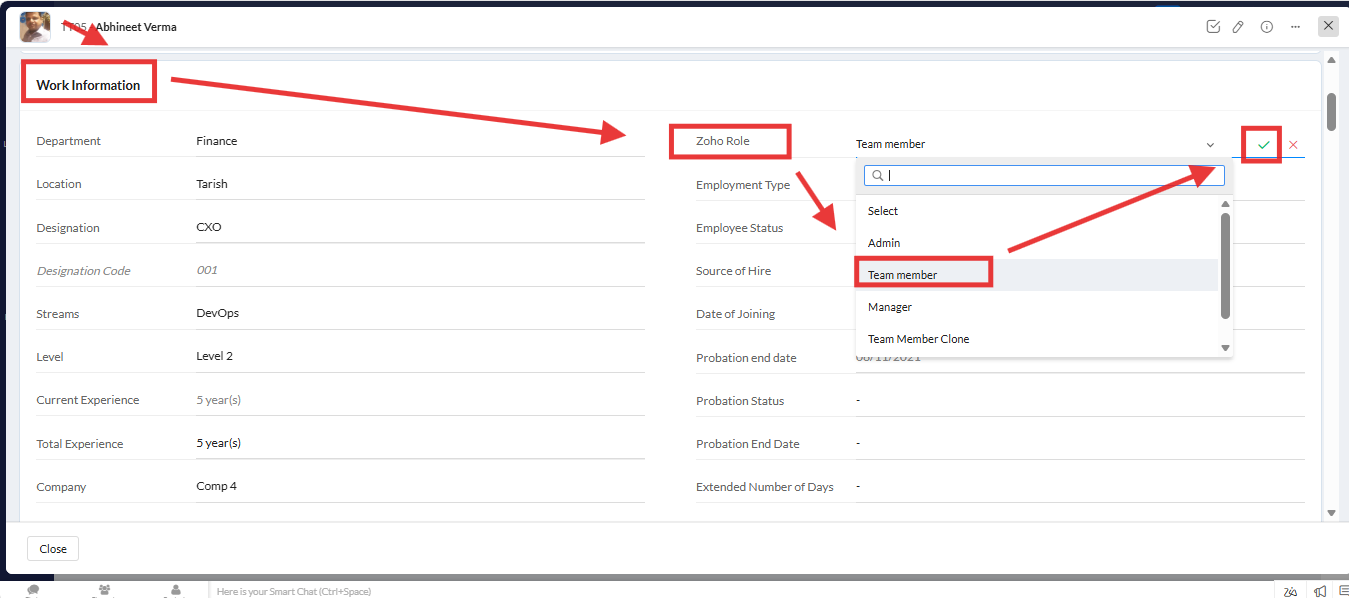
Related Articles
How to change the super administrator in Zoho People 5.0?
To change the super administrator in Zoho People 5.0, please follow the below steps: 1. Log in to your Zoho People account with your super admin credentials 2. Navigate to Settings (top right corner) 3. Click on "Manage Accounts" 4 Click on "Users" ...How to provide an admin access to add new users in Zoho People?
To provide Admin access to add new user in Zoho people. Please log in to Zoho People with Super Admin credentials to top right corner. 1. Please go to the "Settings" to the top right corner and navigate to "Manage Accounts" and click on it. 2. A new ...How to extend the expiry date of an employee’s file access in Zoho People?
To extend the expiry date of an employee’s file access in Zoho People. Please log in to Zoho People with Super Admin credentials. Please follow he below steps. 1. Please go to over all "Settings" and navigate to "Operations" and click on "Files" 2. A ...How to access the inactive user account form details in Zoho People?
To access the inactive user account form details. Please log in to Zoho people with Supper Admin credentials. 1. Please go the "Settings" top right corner of the page and click on " Marketplace" 2. A new screen will be opened and under "Zoho" go to ...How to download the report of user access details with Zoho Role?
To download the report of user access details as per your requirement. Please log in to Zoho People with Super Admin credentials. Please follow the below steps. 1. Please go to over all "Settings" and navigate to "Operations" and click on "Employee ...