How to check the Employee Status in Zoho People?
To check the Employee Status in Zoho People.
Please log in to Zoho People with Super Admin credentials. Please follow the below steps.
1. Please go to "Settings" and navigate to "Manage Accounts" and click on it.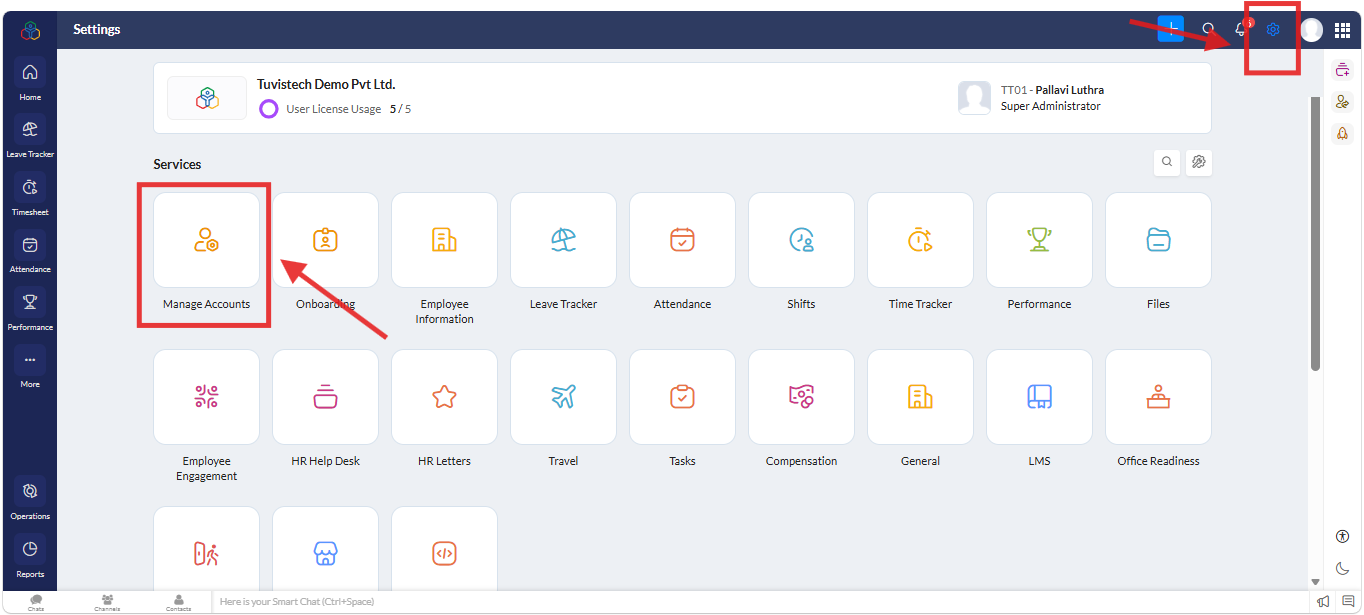
2. A new screen will open. Under "Users", navigate to "All" go to "Basic Information", and verify that the "Employee Status" is set to "Active" for the particular employee.
Related Articles
How to check the status of an employee in Zoho People?
To check the status of an employee in Zoho People. Please log in to Zoho People with Admin credentials. Please follow the below steps. 1. Please go to "Settings" and navigate to "Manage Accounts" and click on it. 2. A new screen will open. Under " ...How to upload salary slips in Zoho People and allow employees to view/download them through the employee portal or mobile app?
To upload salary slips and allow employees to view/download them through the employee portal or mobile app, this can be managed within Zoho People. Please log in to Zoho People with Super Admin credentials. Please follow the below steps. 1. Please go ...How to check the option enabled in the employee’s mobile app under Preferences in the Zoho People Mobile App for particular Modules?
To enabled particular Modules for employee’s Zoho People mobile app under Preferences. Path to check: Open the Zoho People Mobile App >> Tap More (bottom right) >> Tap the three-line menu (top right corner). Please refer to the screenshot for ...How to check the organization tree in Zoho People?
To view the organization employee tree in Zoho People. Please log in to Zoho People with Super Admin credentials. Please go to Home >> Organization >> Employee tree tab.How to check the leave balance of an exited employee?
To check the leave balance of an exited employee. Please log in to Zoho People with Super Admin credentials. Please follow the steps below. 1. Please go to over all "Settings" and navigate to "Reports" on the left side of the page and click on it. 2. ...